
Secure Customer Portals: How to Protect the Digital Front Door of Your Business
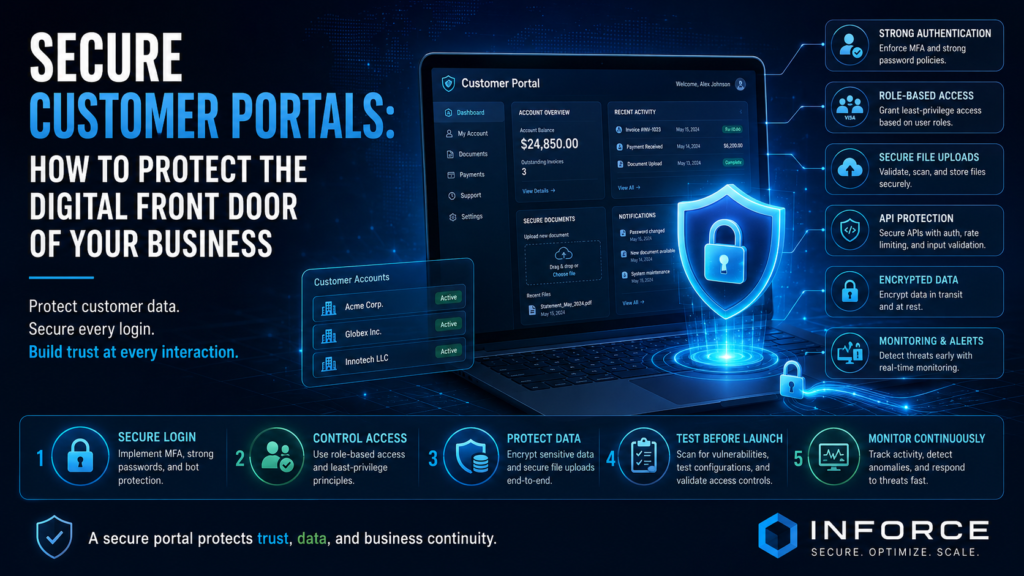
Customer portals have become one of the most important digital touchpoints between businesses and their clients.
They allow users to log in, manage accounts, upload documents, view invoices, make payments, track orders, access services, submit requests, communicate with support teams, and manage personal or business information.
For customers, a portal creates convenience.
For businesses, it improves efficiency, reduces manual work, supports self-service, and strengthens the digital customer experience.
But a customer portal is also a high-value target.
If a portal is not designed, developed, and tested securely, it can expose sensitive data, damage customer trust, interrupt operations, and create serious business risk. A weak login process, broken access control, insecure file upload, exposed API, or poor session handling can turn a useful digital platform into a security problem.
That is why customer portal security should not be treated as a final technical check. It should be built into the portal from the beginning.
A secure customer portal protects users, supports business growth, and gives customers confidence that their data is handled responsibly.
Why Customer Portals Are High-Value Targets
Customer portals often contain valuable information.
Depending on the business, a portal may store names, emails, phone numbers, addresses, contracts, invoices, payment information, health data, financial data, project documents, support tickets, company records, or confidential communications.
Attackers know this.
A compromised customer portal can give attackers access to personal information, business documents, payment flows, user accounts, internal systems, or customer communications. In some cases, attackers may also use the portal to impersonate users, commit fraud, upload malicious files, or move deeper into the company’s digital environment.
The more useful a portal is for customers, the more important it becomes to secure it properly.
Security is not only about preventing attacks. It is also about protecting trust.
When customers log into a portal, they expect the business to protect their identity, data, and interactions. If that trust is broken, the damage can last much longer than the technical incident itself.
Common Security Risks in Customer Portals
Many portal security issues appear because businesses focus mainly on features and design, while security is considered too late.
A portal may look professional and work smoothly, but still contain serious vulnerabilities underneath.
Common risks include:
- Weak authentication
- Poor password reset flows
- Missing multi-factor authentication
- Broken access control
- Users seeing data that belongs to other users
- Insecure file uploads
- Exposed APIs
- Poor session management
- Lack of encryption
- Vulnerable third-party plugins or libraries
- Missing logging and monitoring
- Unclear user roles and permissions
- Insecure admin panels
- Overly detailed error messages
- Poor protection against automated attacks
These risks can affect websites, SaaS platforms, booking systems, dashboards, client portals, e-commerce accounts, internal customer systems, and mobile-connected portals.
The most dangerous vulnerabilities are often not visible to users. They exist in the logic, permissions, integrations, and backend systems that support the portal.
Secure Login Is Only the Beginning
Many businesses think portal security starts and ends with a login page.
A secure login is important, but it is only one part of the security model.
Authentication answers the question: “Who is the user?”
Authorization answers the next question: “What is this user allowed to do?”
Both are essential.
A portal may correctly verify a user’s identity but still allow that user to access another customer’s data if authorization is not implemented properly. This is one of the most serious risks in customer-facing platforms.
A secure portal should include:
- Strong password requirements
- Multi-factor authentication where appropriate
- Secure password reset processes
- Protection against brute-force attacks
- Account lockout or risk-based controls
- Session timeout
- Secure cookie settings
- Proper role-based access control
- Access checks on every sensitive action
- Monitoring for unusual login behavior
Login security must be connected with user permissions, session management, and backend access controls.
Broken Access Control: One of the Biggest Portal Risks
Broken access control happens when users can access information or actions they should not be able to access.
For customer portals, this can be extremely damaging.
For example, one customer might be able to view another customer’s invoice by changing a number in the URL. A regular user might access an admin function. A former employee might still access a company account. A user from one organization might download files belonging to another organization.
These issues are often caused by weak authorization checks.
Access control should not rely only on what is visible in the interface. Even if a button is hidden, the backend must still verify whether the user is allowed to perform the action.
Every sensitive request should be checked.
This includes viewing records, downloading files, updating account details, creating users, changing permissions, submitting payments, accessing reports, and using APIs.
Strong access control is one of the most important parts of a secure portal.
Secure File Uploads Matter
Many customer portals allow users to upload files.
This may include contracts, identification documents, forms, reports, images, invoices, support evidence, resumes, medical files, or project documents.
File upload functionality is useful, but it can also introduce risk.
Attackers may try to upload malicious files, scripts, oversized files, disguised file types, or documents containing harmful content. If uploaded files are not handled properly, they may create security issues for the portal, employees, or other users.
Secure file upload controls may include:
- File type restrictions
- File size limits
- Malware scanning
- Secure storage outside public directories
- Randomized file names
- Access control for downloads
- Validation of file extensions and content
- Logging of upload activity
- Restrictions on executable files
- Safe preview handling
A secure portal should treat every uploaded file as potentially risky until it is validated.
APIs Must Be Protected
Modern customer portals often rely on APIs.
APIs connect the user interface with backend systems, databases, mobile apps, payment providers, CRMs, support platforms, analytics tools, and third-party services.
If APIs are not secured properly, attackers may bypass the portal interface and interact directly with backend services.
Common API risks include:
- Weak authentication
- Missing authorization checks
- Excessive data exposure
- No rate limiting
- Insecure tokens
- Poor input validation
- Lack of monitoring
- Business logic abuse
- Unprotected admin endpoints
API security is especially important for portals connected to mobile apps or external integrations.
Every API endpoint should be designed, documented, tested, and monitored with security in mind.
Protecting Customer Data
Customer portals often process sensitive information. Protecting that data should be a core design requirement.
Data protection includes more than storing information in a database. It includes how data is collected, transmitted, displayed, shared, exported, backed up, and deleted.
Important data protection practices include:
- Encryption in transit
- Encryption at rest for sensitive data
- Secure database configuration
- Limited access to production data
- Careful handling of logs
- Avoiding unnecessary data collection
- Clear data retention rules
- Secure backups
- Protection of exports and reports
- Masking sensitive information where appropriate
- Separation between customer accounts or organizations
Businesses should also consider privacy expectations and regulatory requirements, especially when portals process personal, financial, healthcare, or confidential business information.
A secure portal should collect only what is needed and protect it throughout its lifecycle.
Secure UX: Making Security Easy for Users
Security should not make the portal frustrating to use.
A good customer portal balances protection with usability. If security controls are confusing or difficult, users may look for shortcuts. They may reuse weak passwords, share accounts, avoid security features, or contact support more often.
Secure UX helps users make safe choices naturally.
Examples include:
- Clear login and password reset flows
- Helpful but safe error messages
- Simple multi-factor authentication setup
- Clear account activity notifications
- Easy session logout
- Transparent permission settings
- Confirmation for sensitive actions
- Warnings for unusual activity
- Clear file upload instructions
- Accessible design for all users
Good security design protects users without overwhelming them.
For business portals, this is especially important because the portal must support customer trust, productivity, and satisfaction at the same time.
Admin Panels Need Extra Protection
Customer portals usually have administrative areas where employees manage users, documents, orders, support requests, permissions, settings, and content.
These admin panels are high-risk areas.
If an attacker gains access to an admin panel, they may be able to view customer data, change records, reset accounts, download files, modify permissions, or disrupt services.
Admin security should include:
- Strong authentication
- Multi-factor authentication
- Role-based administrator permissions
- IP restrictions where appropriate
- Logging of administrative actions
- Approval workflows for sensitive changes
- Limited access based on job responsibilities
- Regular access reviews
- Protection against session hijacking
- Monitoring for unusual admin behavior
Admin access should never be treated casually. It should be limited, monitored, and reviewed regularly.
Logging and Monitoring Help Detect Problems Early
Even well-built portals need monitoring.
Security logs help teams detect suspicious activity, investigate incidents, and understand what happened if something goes wrong.
A secure customer portal should log important events such as:
- Login attempts
- Failed logins
- Password resets
- Account changes
- Permission changes
- File uploads and downloads
- Payment-related actions
- Admin activity
- API errors
- Suspicious access attempts
- Unusual data exports
Logs should be protected from tampering and reviewed through appropriate monitoring tools.
Monitoring helps detect issues such as brute-force attempts, account takeover, unusual download activity, unauthorized access attempts, and abuse of portal features.
Without logging, businesses may not know that something suspicious happened until customers report it.
Security Testing Before Launch
A customer portal should be tested before it goes live.
Functional testing confirms that features work. Security testing confirms that features are safe.
Security testing may include:
- Vulnerability assessment
- Web application penetration testing
- API security testing
- Authentication review
- Access control testing
- File upload testing
- Session management testing
- Configuration review
- Dependency and library checks
- Cloud security review
- Secure code review
Testing before launch helps identify issues while there is still time to fix them safely.
This is much better than discovering vulnerabilities after customers are already using the portal.
Security After Launch
Portal security does not end at launch.
New features, updates, plugins, dependencies, integrations, and business requirements can introduce new risks over time.
Ongoing security activities should include:
- Regular updates and patching
- Periodic security testing
- Access reviews
- Monitoring and alerting
- Backup validation
- Dependency reviews
- Cloud configuration checks
- Incident response planning
- Review of user roles and permissions
- Security testing after major changes
A secure portal is not a one-time project. It is a product that needs continuous care.
Questions Every Business Should Ask
If your business already has a customer portal or plans to build one, ask these questions:
Can users access only their own data?
Are all sensitive actions protected by authorization checks?
Is multi-factor authentication available for high-risk users?
Are file uploads validated and scanned?
Are APIs protected from abuse?
Are admin panels strongly secured?
Is customer data encrypted and properly stored?
Are logs collected and monitored?
Are third-party plugins and libraries kept updated?
Has the portal been tested before launch?
Is there a plan for security after launch?
These questions can help identify whether the portal is truly ready for customers.
How INFORCE Helps Build and Secure Customer Portals
INFORCE helps businesses design, develop, test, and improve secure digital platforms.
Whether your company needs a customer portal, booking system, dashboard, SaaS platform, internal business tool, website, or mobile-connected application, INFORCE can support the full lifecycle — from planning and architecture to development, security testing, launch, and ongoing improvement.
Our approach combines software development, web development, mobile applications, cybersecurity, and security testing. This allows security to be considered early, not added only after the product is built.
For new portals, INFORCE can help define secure architecture, user roles, authentication flows, data protection requirements, and testing plans.
For existing portals, INFORCE can review security, identify vulnerabilities, test access controls, assess APIs, and recommend practical improvements.
The goal is to build digital experiences that are useful, scalable, and trusted.
Conclusion
A customer portal is more than a convenience feature. It is the digital front door of your business.
It gives customers access to services, information, documents, payments, communication, and account management. That makes it valuable — and valuable systems need strong protection.
Secure customer portals require more than a login page. They need strong authentication, proper access control, secure file handling, API protection, data encryption, monitoring, testing, and ongoing maintenance.
Businesses that invest in portal security protect more than data. They protect customer trust, operational stability, and long-term growth.
A secure portal helps customers feel confident every time they log in.